Buyers Guide: Choosing the Right Brightness for Outdoor LED Screens
Specify brightness based on ambient light levels and viewing distance. Match nit output to shadow and glare control. Verify lumen maintenance over the product life. Check contrast ratios and uniformity across the full panel array to ensure readable content in direct sun.
- Match brightness to the specific ambient light conditions of the installation site.
- Verify lumen maintenance over the product life to avoid content fading over time.
- Check contrast ratios and uniformity across the full panel array for readable content.
- Confirm that the control system and power supply can handle the selected brightness level.
Why Brightness Matters More Than Resolution
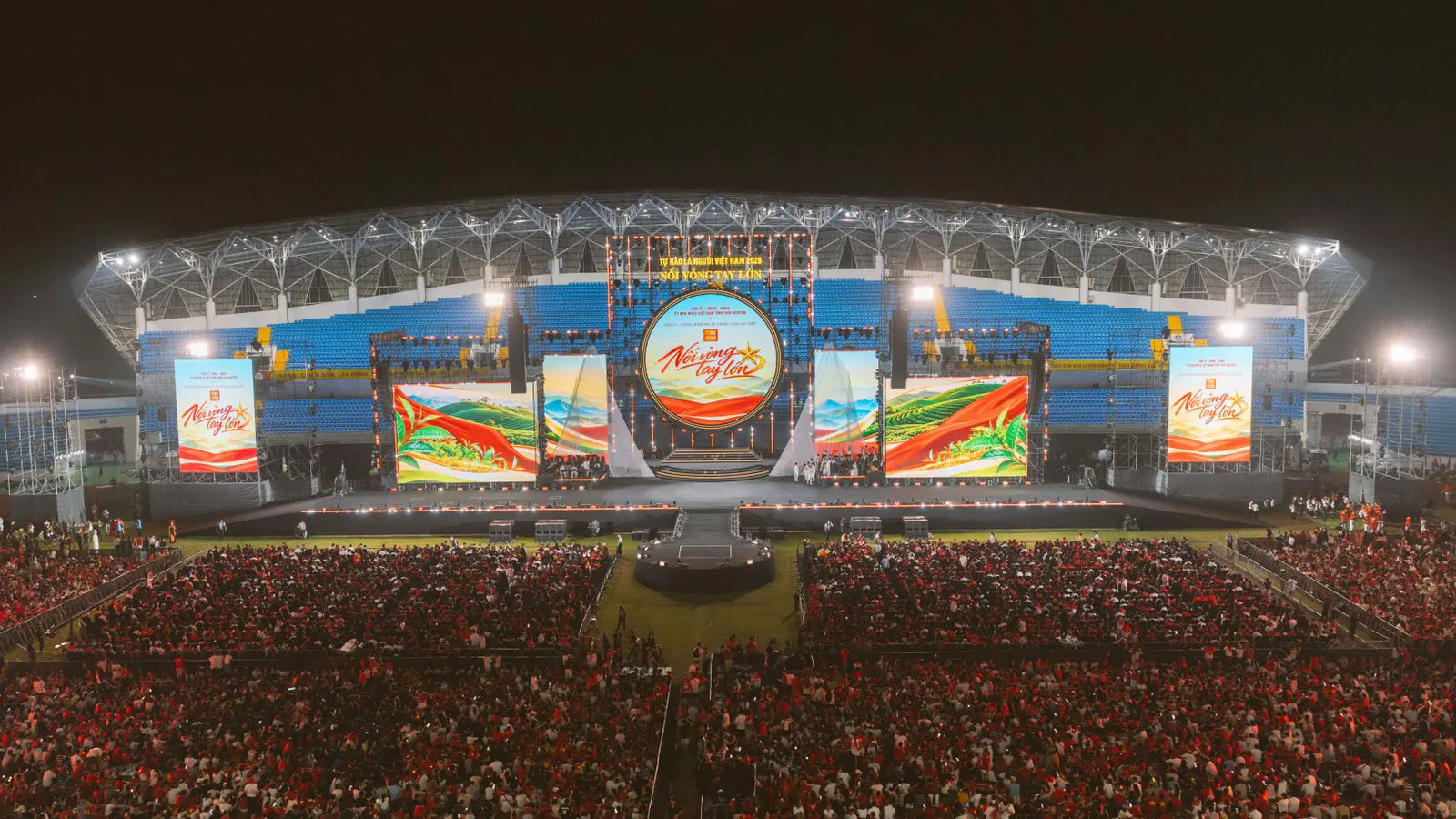
Outdoor LED screens face a very different environment than their indoor counterparts. Direct sunlight is the single biggest factor in image quality. It washes out low-brightness content and creates glare that makes text unreadable. Resolution and pixel pitch matter, but they only work if the panel can push enough light through.
A high-resolution screen with low brightness will look dark and muddy in bright conditions. The viewer will squint, and the image will appear washed out. Procurement managers must treat brightness as a primary specification, not an afterthought.
The correct brightness level depends on three variables. First is the ambient light level at the installation site. Second is the viewing distance. Third is the content type. A screen displaying high-contrast text needs more headroom than a screen showing saturated graphics.
Consider a screen in an open plaza. At noon, the ambient light hitting the panel can be intense. If the screen’s nits are low, the image will struggle to compete with the sky behind it. The black levels will lift, and the whites will fail to stand out. The result is a flat, gray image that loses detail in shadows and highlights.
Indoor screens operate in a controlled environment. The background is dark or neutral. The panel does not need to fight against external light. Outdoor screens do. The sun acts as a competing light source. It adds a uniform layer of brightness to the entire scene. The screen must push enough light to overcome this layer and maintain contrast.
This is why brightness often outweighs resolution in outdoor procurement. A 4K screen with low brightness will perform poorly in daylight. A lower-resolution screen with high brightness will often be more readable at a distance. The eye can resolve detail more easily when the image is bright and high-contrast.
The interaction between brightness and ambient light is non-linear. Doubling the ambient light does not simply require doubling the screen brightness to maintain the same perceived contrast. The human eye adapts to the overall scene. When the background is bright, the eye’s sensitivity decreases. The screen must provide a sufficient difference in luminance to be perceived as distinct from the background.
Procurement managers should ask for the peak brightness in nits and the sustained brightness in nits. Peak brightness is the maximum output for a short duration. Sustained brightness is the level the panel can hold for hours or days without thermal degradation. For outdoor installations, sustained brightness is the more relevant metric. A screen that peaks high but drops quickly will fail in prolonged sunlight.
The physical structure of the screen also affects perceived brightness. The bezels, the frame, and the protective glass or polycarbonate cover can absorb and scatter light. A screen with a thick, dark bezel may lose a small percentage of light output compared to a screen with a slim, reflective frame. This is a minor factor, but it can tip the difference between acceptable and unacceptable contrast in high-glare environments.
How to Measure the Right Brightness for Your Site
There is no single brightness number that works everywhere. A screen in a shaded urban plaza has different requirements than a screen facing a highway. You need to measure the site, not guess.
Start by measuring the ambient light level in lux. This is the standard unit for light intensity. Many LED display manufacturers specify minimum and maximum brightness in nits. The relationship between lux and nits is not always a simple ratio, but there is a general rule of thumb used in the industry.
For direct sunlight, ambient light levels can be very high. For overcast conditions, they are lower. For dusk and dawn, they are even lower. A screen that works well in overcast conditions may fail in direct sun. Conversely, a screen that is too bright in overcast conditions will cause glare and eye strain for viewers.
To measure the site accurately, you must account for the time of day and the season. The sun’s angle changes the light intensity hitting the panel. A screen facing north in the northern hemisphere will receive less direct sunlight than one facing south. You should measure the light at the peak usage times. If the screen is used primarily in the evening, the noon measurements are less critical, but still relevant for the transition period.
Use a calibrated lux meter. Place it at the center of the viewing area, perpendicular to the panel. Measure the light on the day of installation and a few days after to account for weather variations. Record the maximum, average, and minimum values over a representative period.
The ideal brightness is one that maintains a good contrast ratio against the background. If the background is very bright, the screen needs to be brighter to maintain contrast. If the background is dark, the screen can be brighter without causing glare.
Contrast is the key metric here. The contrast ratio is the ratio of the luminance of the brightest part of the image to the luminance of the darkest part. In a bright environment, the darkest part of the image (the blacks) will not be true black. They will be gray. This is because the ambient light reflects off the screen surface and adds to the panel’s output.
To compensate, you need a screen with high peak brightness and a high contrast ratio. A screen with a 2000:1 contrast ratio at low brightness may only have a 1000:1 contrast ratio at full brightness. The difference matters. In direct sunlight, the screen operates at full brightness. The contrast ratio at that point is what determines readability.
You should also consider the content. If the screen displays mostly dark backgrounds with bright text, the contrast ratio is critical. If it displays bright, saturated graphics, the brightness is more critical. A dark background with bright text requires the screen to push the text bright enough to stand out against the reflected light. A bright graphic requires the screen to push the whole image bright enough to maintain color saturation.
Sunlight Readable LED Screens and Contrast Ratios
Sunlight readable led screens are not just about raw brightness. They are about contrast. A screen with high brightness but low contrast will still look washed out. The contrast ratio is the difference between the brightest white and the darkest black the panel can produce.
In direct sunlight, the background light increases the perceived brightness of the entire scene. This makes the black levels of the screen appear gray. The result is a loss of contrast. The image looks flat and washed out.
To combat this, manufacturers use several techniques. One is to increase the brightness of the white points. Another is to use a higher contrast ratio panel. Some screens use local dimming, which reduces brightness in darker areas and increases brightness in brighter areas. This improves perceived contrast.
Local dimming is a complex process. It requires the panel to have multiple zones that can be controlled independently. In a basic LED panel, the brightness is uniform across the screen. In a panel with local dimming, the areas with dark content are dimmed, and the areas with bright content are brightened. This increases the contrast between the two.
However, local dimming is not a magic solution. It requires software support. The content must be processed to identify the bright and dark areas. This adds complexity and cost. For some installations, a simpler approach is sufficient. A high-brightness panel with a high contrast ratio may be enough without local dimming.
Procurement managers should ask for the contrast ratio at full brightness, not at reduced brightness. The contrast ratio at full brightness is the one that matters in direct sunlight. A screen that has a high contrast ratio at low brightness may have a low contrast ratio at full brightness.
The color accuracy also degrades in bright conditions. The LED diodes emit light at specific wavelengths. When the brightness is increased, the color temperature may shift. The whites may become bluer, and the yellows may become greener. This can affect the perception of the image.
To maintain color accuracy, the screen must have good color management. The control system should be able to adjust the color temperature and saturation in real-time based on the ambient light. This is a feature of higher-end controllers. It is worth asking for during the selection process.
Viewing Distance and Pixel Pitch
Viewing distance affects how much brightness a screen needs. The farther the viewer is from the screen, the less brightness is required. This is because the human eye can resolve less detail at a distance. The viewer does not need to see every pixel.
Pixel pitch is the distance between the centers of two adjacent pixels. A smaller pixel pitch means higher resolution. But it also means less brightness per pixel. The total brightness of the screen is the sum of the brightness of all the pixels. If you have a smaller pixel pitch, you have more pixels. Each pixel can be dimmer, but the total brightness may be the same.
The relationship between pixel pitch, viewing distance, and brightness is not linear. It depends on the specific panel technology and the content. But as a general rule, a screen with a smaller pixel pitch needs more brightness to be visible at a distance.
For example, a screen with a 2.5mm pixel pitch is typically used for indoor installations or short viewing distances. It has high resolution, but each pixel is small and may not emit enough light to be visible in bright sunlight from a distance. A screen with a 10mm pixel pitch is used for outdoor installations with longer viewing distances. The pixels are larger, and each one can emit more light. This makes the screen visible from farther away.
The content type also matters. Text and high-contrast graphics need more brightness than saturated colors. A screen displaying a movie with bright, saturated colors may not need as much brightness as a screen displaying a traffic map with white text on a dark background.
When selecting a pixel pitch, consider the primary content. If the screen is used for news tickers and headlines, text readability is the priority. A smaller pixel pitch may be needed to display fine details. If the screen is used for large graphics and video, a larger pixel pitch may be sufficient. The brightness per pixel must be high enough to maintain readability at the intended viewing distance.
Power, Heat, and Lumen Maintenance
Brightness is not just about the panel. It is about the entire system. The power supply must be able to handle the current draw of a high-brightness screen. A screen that is too bright for its power supply will overheat. This can cause premature failure.
High brightness generates heat. Heat reduces the lifespan of the LED diodes. It can also cause color shift. As the diodes age, they emit less light and shift in color. This is called lumen maintenance.
Lumen maintenance is the percentage of the original brightness that a panel retains over time. A panel with 80% lumen maintenance after five years will be 20% dimmer than it was when new. This can be a problem for outdoor screens that need to maintain a minimum brightness level.
The power supply is a critical component. It converts the AC input to the DC voltage required by the LED diodes. If the power supply is undersized, it will not be able to provide the necessary current. The screen will dim, or the power supply will overheat and fail.
When selecting a power supply, look for one with a high efficiency rating. A more efficient power supply generates less heat, which extends the lifespan of the entire system. It also reduces the risk of overheating in high-brightness applications.
The control system also plays a role. It manages the brightness of the screen based on the ambient light. It can reduce the brightness in low-light conditions to save power and reduce glare. It can increase the brightness in high-light conditions to maintain contrast. This dynamic adjustment extends the lifespan of the diodes by preventing them from operating at full brightness for extended periods.
The warranty is another important factor. A warranty that only covers the panel, not the power supply or control system, may not be sufficient. The entire system needs to be covered. Ask for the warranty terms and conditions. Check the coverage period and the repair process.
A Criteria Table for Selecting Brightness
The following table summarizes the key criteria for selecting the right brightness for an outdoor LED screen.
| Criterion | What to look for | Why it matters |
|---|---|---|
| Ambient light level | Measure in lux at the site | Determines the minimum brightness required |
| Viewing distance | Typical distance of the audience | Affects the required brightness per pixel |
| Content type | Text, graphics, video | Text and high-contrast graphics need more headroom |
| Contrast ratio | Ratio at full brightness | Maintains image quality in direct sunlight |
| Lumen maintenance | Percentage retention over time | Ensures the screen stays readable over its life |
| Power supply | Capacity to handle current draw | Prevents overheating and premature failure |
Closing Decision Checklist
Use this checklist to verify that you have specified the correct brightness for your outdoor LED screen.
- Confirm the ambient light level at the installation site. Measure it in lux.
- Determine the typical viewing distance for the audience.
- Identify the primary content type. Is it text, graphics, or video?
- Request the contrast ratio at full brightness from the manufacturer.
- Verify the lumen maintenance data over the expected life of the screen.
- Check that the power supply can handle the current draw of the selected brightness level.
- Review the warranty to ensure it covers the entire system, not just the panel.
Brightness is a critical factor in outdoor LED screen performance. It is not a one-size-fits-all specification. It must be tailored to the specific installation site. By measuring the ambient light, considering the viewing distance, and verifying the lumen maintenance, procurement managers can ensure that their outdoor LED screens are readable and reliable.
Frequently asked questions
What is the minimum brightness for an outdoor LED screen?
There is no single minimum. It depends on the ambient light level at the installation site. A screen in direct sunlight needs more brightness than a screen in a shaded area.
How do I measure the ambient light level at my site?
Use a lux meter. Measure the light level at the screen location at the time of day when the screen will be in use.
What is the difference between nits and lux?
Nits measure the brightness of the screen itself. Lux measures the ambient light level around the screen. The relationship between the two is not linear.
Does a smaller pixel pitch require more brightness?
Generally, yes. A smaller pixel pitch means more pixels, and each pixel can be dimmer. However, the total brightness may be the same. The viewing distance also affects this.
How does lumen maintenance affect my decision?
Lumen maintenance is the percentage of original brightness the panel retains over time. A low lumen maintenance rating means the screen will become dimmer over time. This can make it unreadable in direct sunlight.